Getting help and support
How to reach Curia support from inside the app - chat with the assistant, raise a ticket, or send an idea to the product team.
Click Support on the left-hand menu to open the support panel. A small dot on the icon flags an unread message or news item.
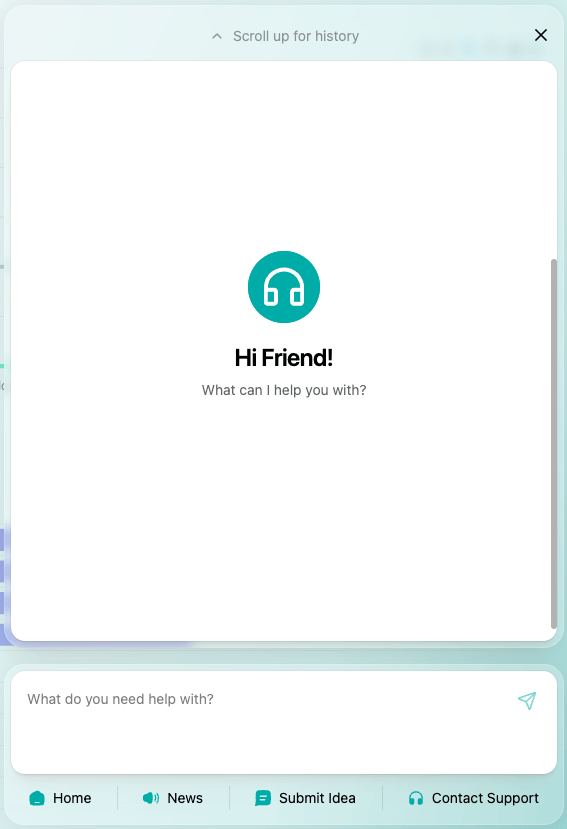
The panel covers four things: chat with the assistant, news from Curia, an idea form for the product team, and a ticket form to the support team.
Chat with the assistant
The assistant answers questions about Curia from the help library. Type the question in plain language. If the assistant can’t fully resolve it, it offers a handover to the support team.


Raise a ticket
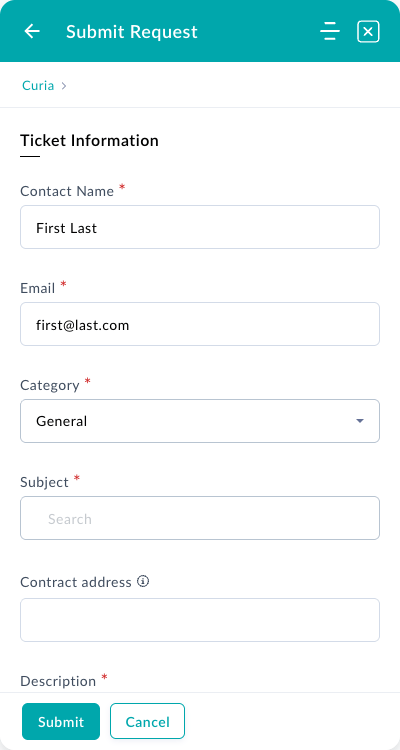
Select Contact support in the panel to open the ticket form. Provide:
- Your name and email
- Issue category
- Subject
- Contract address, if the question relates to a specific review
- A description
The most useful descriptions are framed as “I tried to do X, Y happened, I expected Z”. Including the contract address speeds up follow-up.
Curia support handles questions about the Curia application. We don’t give legal or conveyancing advice.
Submit an idea
Submit idea in the panel sends feature requests and feedback straight to the Curia product team.
Write to support@curia.com.au. Support runs during Australian business hours; urgent issues are prioritised.
FAQ
How quickly will I get a response?
Response times vary with complexity. Urgent issues are prioritised.
Does Curia support give legal or conveyancing advice?
No. We answer questions about the Curia application only.
Where can I report a bug?
Use Contact support in the panel, or email support@curia.com.au.