Section 32 Vendor Statement
A walkthrough of every field on the Vendor Statement tab, grouped by s32 subsection.
The Vendor Statement tab on a VIC review carries every field Curia extracts from the contract’s Section 32.
Financial matters
- Total outgoings not exceeding - the stated cap on combined rates, taxes and charges for the property.
- Outgoing items - a list of individual outgoings, each with the authority, amount and period.
- Mortgage or charge details - any mortgage or charge that won’t be discharged at settlement.
- Statutory charges disclosed - whether the vendor has disclosed any statutory charges.
- Tax reform scheme land - whether the land falls under the Commercial and Industrial Property Tax reforms. Setting this to Yes reveals two more fields:
- Australian Valuation Property Classification Code - the AVPCC value applicable to the property.
- Commercial and Industrial Property Tax entry date - the date the land entered the tax reform scheme. Toggle this field off when the Section 32 gives no fixed date.
- Terms contract - whether the contract is a terms contract.
Insurance
- Vendor insurance disclosed - whether vendor insurance has been disclosed.
- Owner-builder insurance disclosed - whether owner-builder insurance has been disclosed for a recently built dwelling on the property.
Land use
- Restrictions disclosed - whether the vendor has disclosed easements, covenants or other restrictions affecting the land. Setting this to Yes reveals:
- Road access - whether the land has road access.
Notices
- Public authority notices disclosed - whether the vendor has disclosed notices, orders, declarations or approved proposals from any public authority.
- Agricultural and contamination notices disclosed - whether the vendor has disclosed livestock disease or chemical contamination notices. This field also offers Unknown, for when the Section 32 refers to its attachments instead of answering. An Unknown answer raises the Agricultural and contamination notices unknown question, provided it is Active in your Recommendation Library.
- Compulsory acquisition disclosed - whether a notice of intention to compulsorily acquire all or part of the land has been disclosed.
Building permits
- Building permits disclosed - whether building permits issued for the property in recent years have been disclosed.
Growth Areas Infrastructure Contribution
- Growth Areas Infrastructure Contribution details - any GAIC liability or exemption affecting the land.
Services
- Services not connected - a list of standard utilities (electricity, gas, water, sewer, telephone) not currently connected to the property.
Answers that refer to the attachments
Some vendor statements answer a disclosure by referring to the attached certificates and searches rather than saying yes or no. Where an attached document shows the answer, Curia records it from that document. Where nothing in the contract settles it, the field is left blank for you to answer, except Agricultural and contamination notices disclosed, which is set to Unknown. Either way, a Ria Finding on the field explains how the answer was reached and names the pages it came from.
Sources disagree
When the Section 32 answers Statutory charges disclosed, Restrictions disclosed or Public authority notices disclosed as No, but an attached document shows one, a Sources disagree warning appears on the field. The warning names the document, such as the Land Information Certificate or the title search. When the document’s page is known, a button such as Show Land Information Certificate jumps to it.
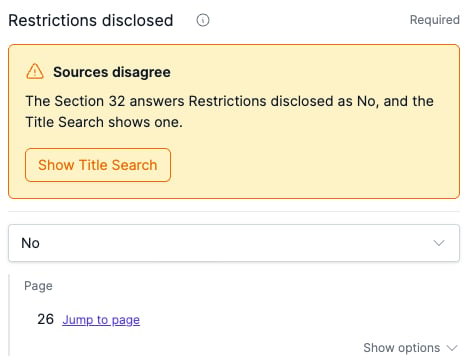
Compulsory acquisition disclosed is checked against the title search whichever way it is answered. The warning also appears when the Section 32 answers Yes but the title searches for the contract’s titles record no notice of intention to acquire.
The warning updates as you edit. Changing the answer to match the document clears it.
Commercial and Industrial Property Tax in the report
When Tax reform scheme land is set to Yes, Curia’s default report template includes a Commercial and Industrial Property Tax section telling the buyer when CIPT will first become payable. It doesn’t appear when the land isn’t scheme land.
The Commercial and Industrial Property Tax entry date drives the wording. When the entry date is shown, the report works from that date. When the field is toggled off, the report treats this contract as the transaction that brings the property into the scheme and works the timing from settlement.
What sits on other tabs
A few items conveyancers think of as Section 32 fields live elsewhere in Curia:
- Owners Corporation - on the Owners Corporations tab. See Working with Owners Corporations.
- Due Diligence Checklist - on the General tab.
- Title and subdivision details - on the Titles tab.
Preflight check
Preflight checks that the Section 32 Vendor Statement is attached to the contract. The check passes when the document is detected and warns when it’s missing.
FAQ
Can I add a field that Curia missed?
No. The Vendor Statement tab carries a fixed set of fields covering every s32 disclosure subsection. Edit the existing fields to match the contract.
Why isn’t the AVPCC field showing?
It only appears when Tax reform scheme land is set to Yes. Set that field first and the AVPCC and tax reform entry date fields appear.
Why isn’t the existing non-compliance field showing?
It only appears when Restrictions disclosed is set to Yes.
What happens if the Section 32 isn’t in the contract?
Preflight raises a warning that the Vendor Statement is missing, and the fields on this tab aren’t pre-filled.