The Tenancy tab
Record occupancy status and tenancy agreement details for a property subject to existing tenancies.
Occupancy status
The Occupancy status field on the Particulars tab records whether the property is currently tenanted. Two options:
- Vacant possession - no tenancy agreements in place.
- Subject to tenancies - one or more tenancy agreements are in place.
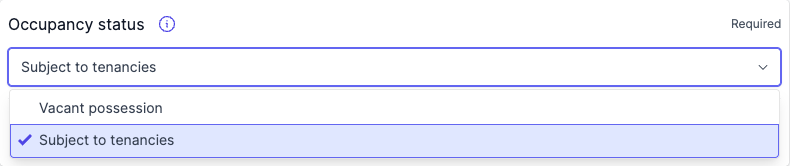
Setting the status to Subject to tenancies opens the Tenancy tab. Switching back to Vacant possession clears any recorded tenancy agreements.
While the status is Subject to tenancies and the list here is empty, the Occupancy status field carries a Tenancy agreements missing warning. Adding an agreement to the list clears it; a lease left in the Unmatched Tenancies alert does not.
How tenancy agreements are populated
Curia identifies the tenancy agreements in the contract, matches each one to the lot being purchased, and pre-fills the Tenancy tab with the extracted details.
Unmatched tenancies
Leases Curia can’t match to the lot being purchased appear in an Unmatched Tenancies alert at the top of the tab under Needs action, rather than in the tenancy list. Each entry shows the premises recorded in the lease, where Curia found one, along with the lessee, the rent and the term, so you can tell the leases apart without opening each one. Where Curia can give a reason the lease couldn’t be matched, it sits below that.
An entry is also labelled where Curia has tied it to another lease, naming the entry it duplicates or renews, as in likely duplicate of Tenancy 2 or likely superseded by Tenancy 1. Where the counterpart is itself unmatched, the label is the bare likely duplicate or likely superseded by renewal.

Each entry offers two actions:
- Add to Tenancies moves the lease into the list, where it can be edited like any other entry.
- Dismiss removes it from Needs action.
Where Curia identified the page, a Go to page link opens it.
Dismissed leases don’t disappear. They move to a list below Needs action, where Restore brings one back.
Adding a tenancy agreement
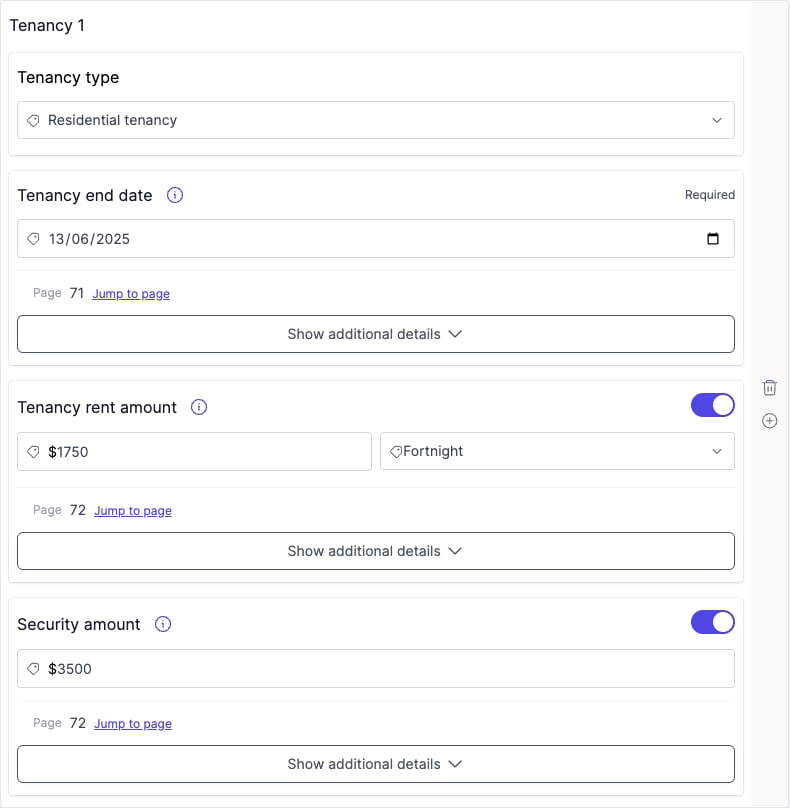
On the Tenancy tab, click Add tenancy information and complete the fields. Repeat for each agreement.
Tenancy agreement fields
- Tenancy type - residential or commercial.
- End date - when the agreement expires.
- Rent amount and Rent period - the rental amount and its frequency (weekly, monthly).
- Security amount - the bond or security deposit held under the agreement.
Removing a tenancy agreement
Click the delete button on the entry you want to remove.
Report output
Each tenancy agreement on the list has its own sub-section under Tenancy in the report. A tenancy summary follows the individual entries. Leases left in the alert, whether under Needs action or dismissed, are not included.
Preflight
The Preflight check lists every tenancy agreement Curia detected, including any sitting in the Unmatched Tenancies alert, so you can confirm every agreement was picked up before generating the report. The Preflight count can therefore be higher than the number of agreements on the tab and in the report.
Recommendations
When the occupancy status is Subject to tenancies but no agreements have been recorded, Curia raises a recommendation requesting copies of all current tenancy agreements.
FAQ
Does Curia detect tenancy agreements automatically?
Yes. Tenancy agreements identified during processing are pre-filled on the Tenancy tab.
Can I record multiple agreements?
Yes. Click Add tenancy information on the Tenancy tab to create as many agreements as needed.
What happens when I switch back to Vacant possession?
Any tenancy agreements you have recorded are cleared and the Tenancy tab is no longer available.