Reassign a review to another user
Move a review from one team member to another. The new assignee is notified by email and all review data is preserved.
A review has one assigned user at a time. To reassign:
- Open the Reviews page.
- Find the row for the review you want to reassign.
- Click the action menu on the row and choose Assign to user.
- Pick the new user from the searchable list, then click Assign.
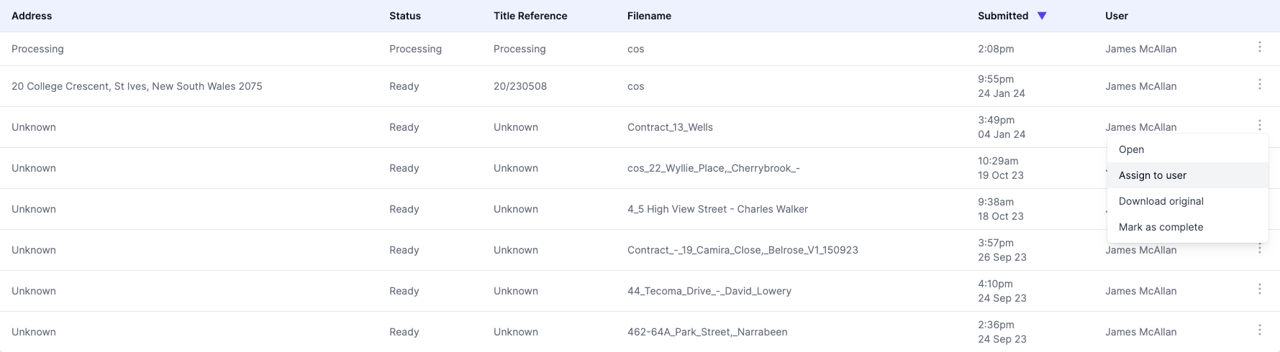
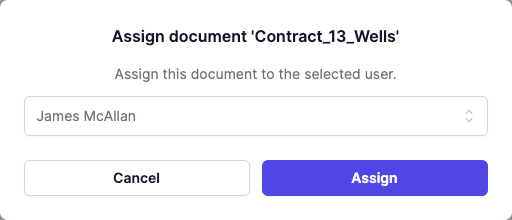
You can also reach Assign to user from the menu icon in a review’s header, without returning to the Reviews page.
The new user is sent an email about the assignment.
What carries over
Reassignment changes the owner of the review and nothing else. Every field, note, recommendation, and decision the previous user made stays in place. The new owner picks up where the last one left off.
FAQ
Can I reassign more than one review at once?
No. Reassign one review at a time.
Who can be assigned a review?
Any current user in the account. Deleted users aren’t in the picker.
Does the previous owner’s work get lost?
No. All review data is preserved; only the owner changes.