Understanding review states
A review moves from Processing to Ready, In review and Completed, and can be closed along the way. What each status means and how to move a review between them.
Where you see review states
Each review shows its status on its row in the Reviews list and in the review header when you open it.
- Processing - Curia is still extracting data from the contract.
- Ready - extraction is done and the review is waiting for you to start it.
- In review - you have started the review and are working through it.
- Completed - you have finalised the review and generated the report draft.
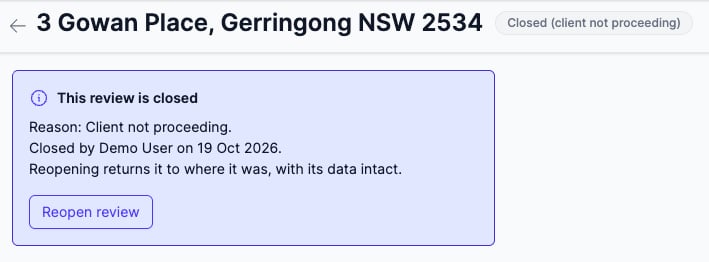
- Closed - the review was closed before it was completed. The reason shows with the status, for example
Closed (client not proceeding).
The Pending reviews tab holds your reviews that are Processing, Ready or In review. The Closed reviews tab holds your reviews that are Completed or Closed.
flowchart TD
  A[Upload] --> B[Processing]
  B -->|Extraction| C[Ready]
  C -->|Start review| D[In review]
  D -->|Generate Draft| E[Completed]
  E -. "Reopen review" .-> D
  C -->|Close review| F[Closed]
  D -->|Close review| F
  F -. "Reopen review" .-> C
  F -. "Reopen review" .-> D
Processing
A review enters Processing as soon as you upload the contract. Curia reads the contract and pulls out the data the review needs. This usually takes between 5 and 15 minutes and depends on the size and complexity of the contract.
While a review is processing, opening it shows how far processing has got. The review tabs and Start review become available once processing finishes.
Ready
When extraction finishes, the status changes to Ready and the assigned user is sent an email notification. Open the review and click Start review on the Preflight tab to begin. The review moves to In review.
In review
On an In review review you edit the review tabs and your changes save as you go. It stays In review until you finalise it on the Finalise tab or close it.
Completed
Clicking Generate Draft on the Finalise tab moves the review to Completed. The review data is locked, and you edit and download the report from the Finalise tab. See Finalising and downloading your report.
To change the review data after that, click Reopen review and make changes on the Finalise tab. Clicking any of the review data tabs on a completed review offers the same thing. The review returns to In review and the current report draft is discarded, but every report version you have already downloaded is kept. See Report versions.
Closing a review
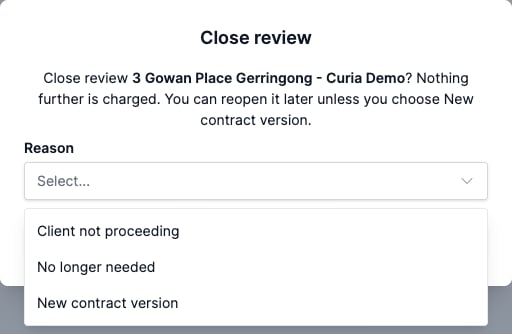
Close a review when you are not going to complete it. A Ready or In review review can be closed from any of these:
- Close review in the row actions on the Reviews list
- Close review in the menu in the review header
- The Close review button on the Preflight tab, before you start the review
Pick a Reason and click Close review to confirm. Nothing further is charged.
Opening a closed review shows the reason, who closed it and when.
Automatic closing
A Ready or In review review with no activity for 60 days closes automatically with the reason Inactive, and the assigned user is sent an email. Saving changes to the review, starting, finalising or reopening it, and downloading the report all count as activity. Opening a review to look at it does not.
Reopening a closed review
A closed review returns to the status it was closed from, Ready or In review, with its data intact. To reopen one, either:
- Click Reopen review in the row actions on the Closed reviews tab, or
- Open the review and click Reopen review.
A review closed as New contract version or Failed cannot be reopened.
FAQ
How long does processing take?
Between 5 and 15 minutes for most contracts. Larger or more complex files take longer.
Why is a completed review on the Closed reviews tab?
The Closed reviews tab holds every review you have finished with, whether it was completed or closed. Reopening a completed review moves it back to Pending reviews.
Why was my review closed when I didn’t close it?
Check the reason on the review. Inactive means it closed automatically after 60 days without activity, and you can reopen it. If the reason is Failed, Curia support closed it because the contract could not be processed. Contact support about these.