Using the Swimming Pool fields
Record pool compliance status and certificate details for a property with one or more swimming pools.
How pool information is populated
NSW NSW: details specific to New South Wales reviews
During document processing, Curia identifies pool compliance and non-compliance certificates in the contract and pre-fills the Swimming Pool tab with the extracted details. Each detected certificate becomes a separate pool entry.
If no compliance or non-compliance certificate is found but a registration certificate is detected, a pool entry is created with Pool compliance set to Unknown and Pool registration to Yes. If no certificates are found at all but the contract front page mentions a pool, a pool entry is created with both left as Unknown.
Review and edit the pre-filled data, add new pool entries by hand, or remove entries that aren’t required.
VIC VIC: details specific to Victoria reviews
During document processing, Curia identifies pool and spa barrier compliance and non-compliance certificates in the contract and pre-fills the Swimming Pool tab with the extracted details. Each detected certificate becomes a separate pool entry.
Adding a pool entry
On the Swimming Pool tab, click Add pool and fill in the fields. Repeat for each pool.
Pool fields
NSW NSW: details specific to New South Wales reviews
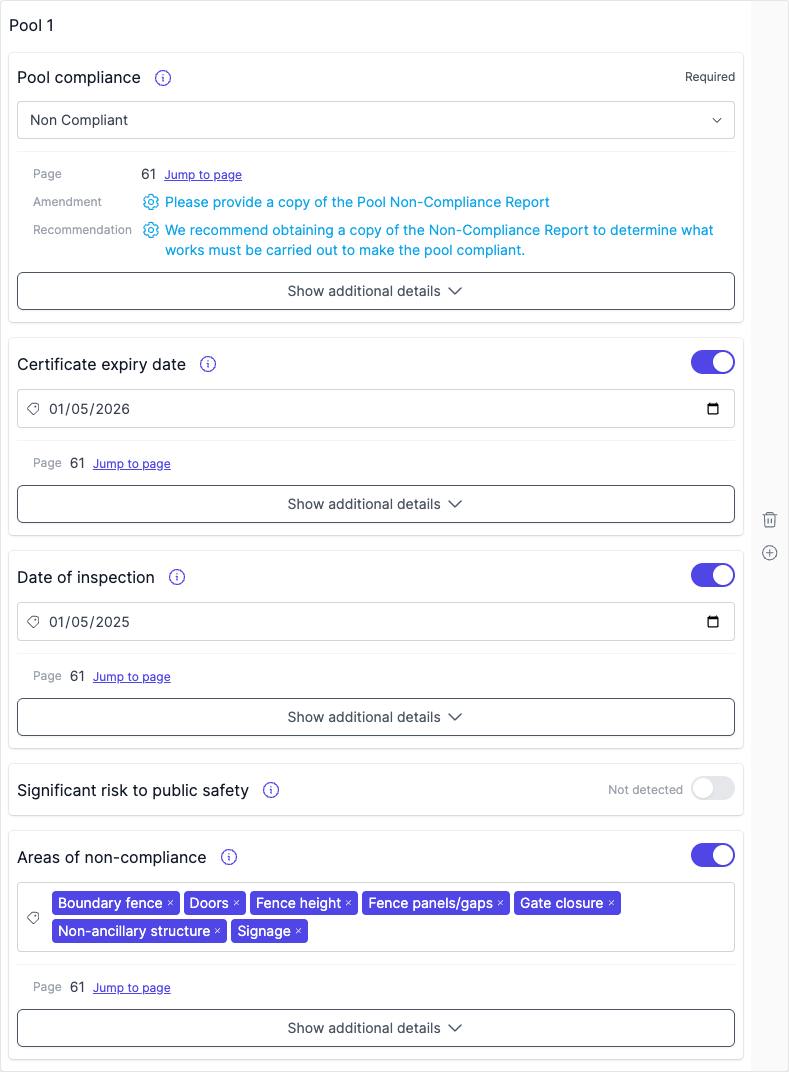
- Pool compliance - Compliant, Non Compliant, or Unknown.
- Pool registration - whether the pool is registered with the relevant authority.
- Certificate expiry date - when the pool certificate expires. Shown for Compliant and Non Compliant.
- Date of inspection - when the inspection was conducted. Shown for Non Compliant.
- Significant risk to public safety - yes/no. Shown for Non Compliant.
- Areas of non-compliance - the specific areas where the pool does not comply. Shown for Non Compliant.
VIC VIC: details specific to Victoria reviews
- Pool barrier compliance - Compliant, Non Compliant, or Unknown.
- Pool registration - whether the pool is registered with the relevant council.
- Date of inspection - when the inspection was conducted. Shown for Non Compliant.
- Areas of non-compliance - the specific areas where the pool does not comply. Shown for Non Compliant.
Removing a pool entry
Click the delete button on the entry you want to remove.
Report output
Each pool entry has its own sub-section under Swimming Pool in the report.
NSW NSW: details specific to New South Wales reviews
A pool set to Yes on Pool registration reports on its certification. Any other value reports on registration instead.
A pool set to Non Compliant also reports its inspection details and its areas of non-compliance, whatever the registration value. When Significant risk to public safety is Yes on a Non Compliant pool, the report adds a significant risk statement.
VIC VIC: details specific to Victoria reviews
Each pool reports on its barrier compliance and on its registration, with the areas of non-compliance between them where the pool is non-compliant.
Registration is its own item in the report template, separate from the compliance content, so each can be edited or excluded on its own. See Editing your report template.
Preflight
NSW NSW: details specific to New South Wales reviews
The Preflight check lists each detected pool with its certificate status:
- “Compliance certificate provided” - Pass.
- “Non-compliance certificate provided” - Pass.
- “No compliance or non-compliance certificate provided” - Warning.
The overall pool section Passes when every pool has either a compliance or non-compliance certificate.
Recommendations
Recommendations are raised automatically from the compliance status and from the registration status, provided the recommendation is Active in your Recommendation Library.
From compliance:
- Non Compliant - request the pool non-compliance report so the required works can be assessed.
- Unknown - note that a pool is referenced on the contract and request the compliance certificate.
From registration:
- No - ask the vendor to confirm the pool is registered.
- Unknown - ask the vendor to clarify whether the pool is registered.
FAQ
Does Curia detect pool certificates automatically?
Yes. Compliance and non-compliance certificates are identified during processing and pre-fill the Swimming Pool fields.
Can I record multiple pools?
Yes. Click Add pool on the Swimming Pool tab to create as many entries as needed.
What does each compliance status mean?
- Compliant - the pool has a valid compliance certificate.
- Non Compliant - the pool has a non-compliance certificate.
- Unknown - a pool is referenced on the contract but no compliance or non-compliance certificate was detected.