Reading the Pulse figures
What each Curia Pulse panel measures, from review activity and working hours to the property mix and the issues Preflight finds.
Most panels open with a headline figure and a sentence summarising what they show. Headline figures carry a change label against the same month a year earlier, or the previous month when there’s no figure for a year earlier. Where Pulse has figures for your firm, they’re labelled Your firm. For how comparisons and downloads work, see Curia Pulse.
How busy is everyone
You vs the network
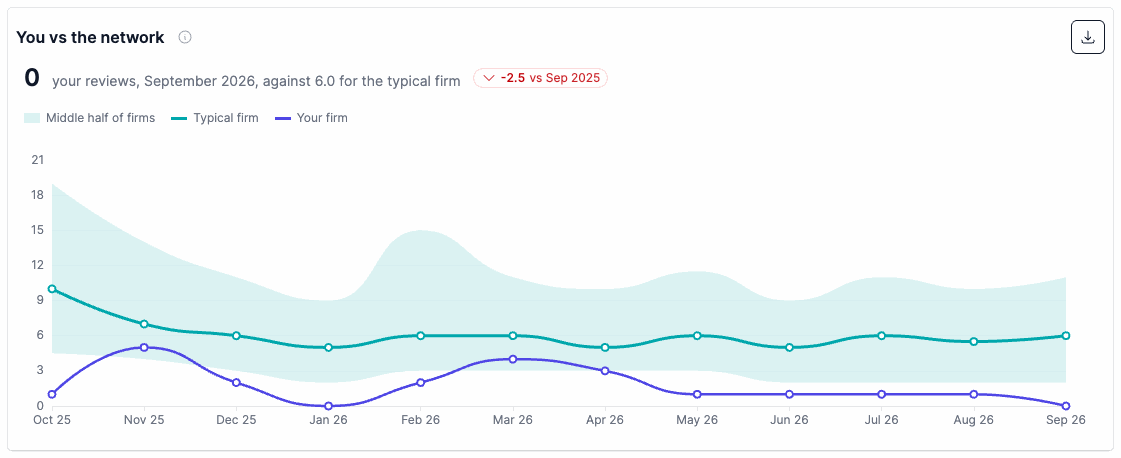
Your firm’s monthly reviews over the last 12 months against established firms, those on Curia for three months or more. The solid line is the typical firm and the shaded band is the middle half of firms.
The headline gives your reviews for the latest month against the typical firm’s. A sentence places your firm among established firms that month, for example ahead of about seven in 10.
How the industry is performing
How the typical established firm’s monthly reviews compare with the same month a year earlier, one bar for each of the last 12 months. Bars are coloured as Busier than a year ago or Quieter than a year ago. The headline gives the change for the latest month.
The figure is a per-firm rate, so it doesn’t move as the Curia network grows.
Reviews per week, by firm size
Median reviews completed per week in the latest month, grouped by the number of staff at the firm: Solo, 2 staff and 3+ staff. Your firm has its own row labelled Your firm.
When is everyone working
By hour of day
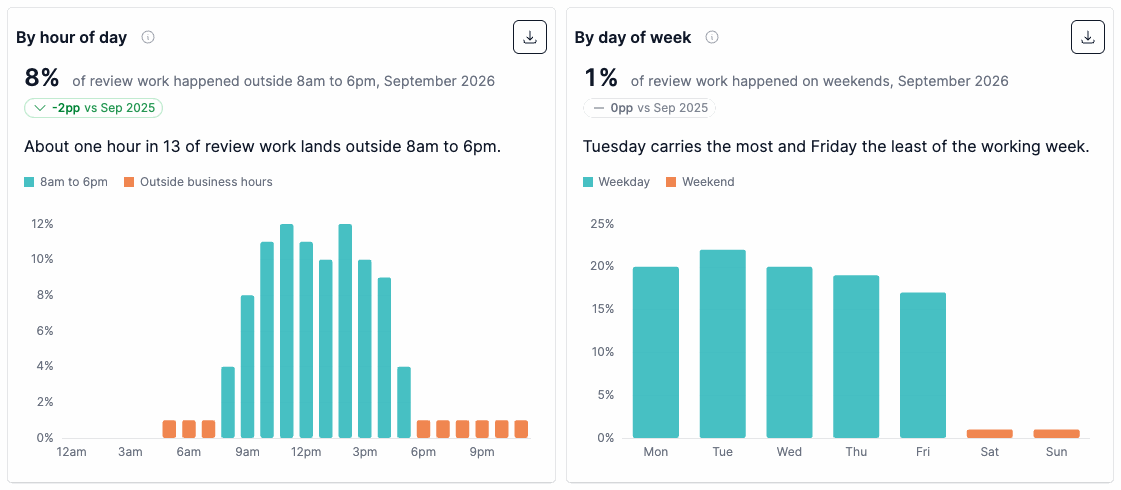
The share of review work started in each hour of the day over the last 12 months, with hours outside 8am to 6pm shaded. The headline gives the share of work outside those hours in the latest month.
Where Pulse has figures for your firm, a line shows your firm’s hours, and two bars compare your share of work outside business hours with the network’s.
By day of week
The share of review work started on each day of the week over the last 12 months. The headline gives the share of work done on weekends in the latest month, and the summary names the busiest and quietest weekdays.
Your firm’s days and weekend share are shown the same way as on the hour of day panel.
How long a review takes
The median time spent in Curia on the review itself, by contract type, over the last 12 months. It’s the time on the review, not the elapsed time of the whole matter. Where Pulse has figures for your firm, a second bar shows your firm’s median for the contract types it has reviewed.
NSW NSW: details specific to New South Wales reviews
Contract types are Deposited plan, Strata plan, Parent / community and Unregistered (OTP).
VIC VIC: details specific to Victoria reviews
Contract types are With owners corporation, No owners corporation and Unregistered (OTP).
Who is buying, and what
Property mix over time
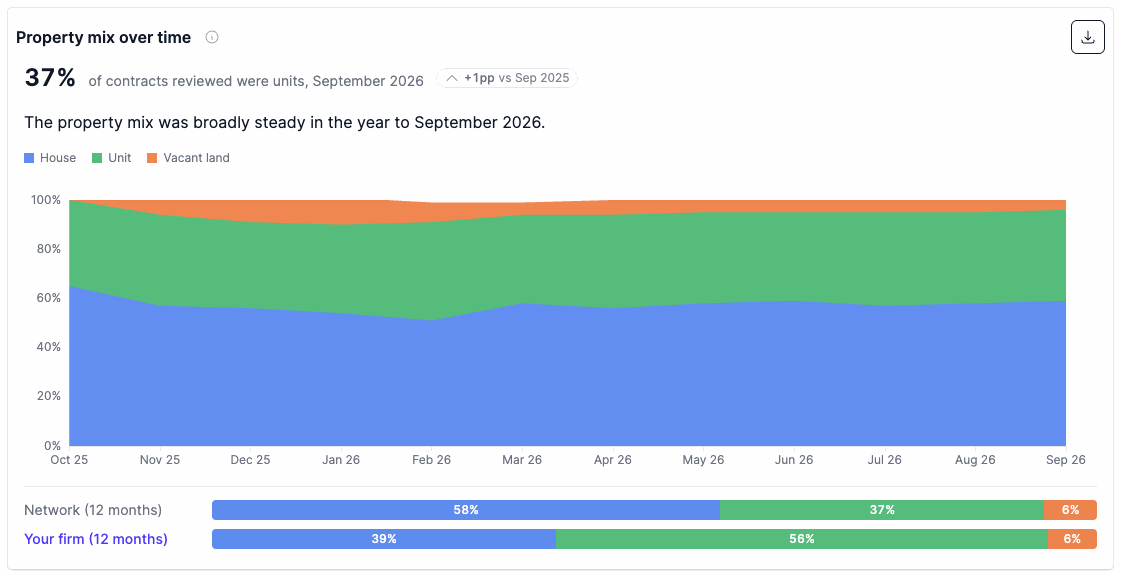
The share of contracts reviewed each month by property type, over the last 12 months. The shares add up to 100%.
NSW NSW: details specific to New South Wales reviews
Property types are House, Unit and Vacant land. The headline gives the share of contracts that were units.
VIC VIC: details specific to Victoria reviews
Property types are With owners corporation, No owners corporation and Vacant land. The headline gives the share of contracts with an owners corporation.
Where Pulse has figures for your firm, bars compare your firm’s mix over the last 12 months with the network’s, where the network figure is published.
Buyer and title trends
Four cards cover buyer and title trends:
- Investor buyers
- First home buyers
- Vacant land
- Unregistered titles
First home buyers counts purchasers eligible for first home buyer assistance. Each card gives the share for the latest month, a line for the last 12 months and a change label. Each share counts only the reviews where that detail was recorded. Where Pulse has figures for your firm, the card also shows your firm’s share over the last 12 months.
The issues we catch most
What we find in 100 contracts
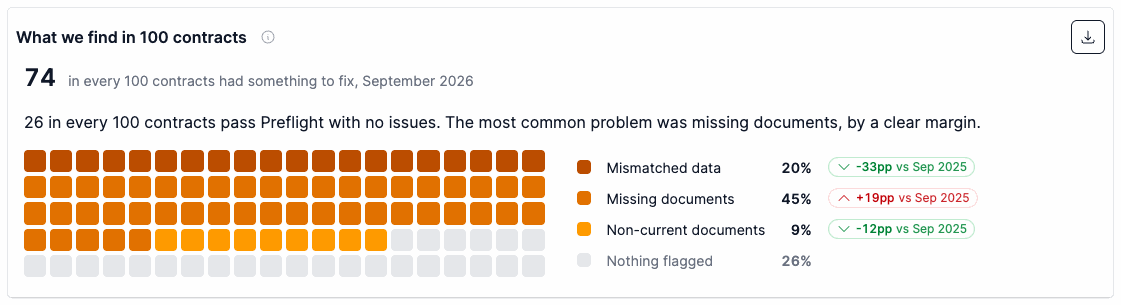
What Preflight found across the network’s contracts in the latest month, shown as 100 squares. The headline gives how many in every 100 contracts had something to fix, and the summary gives how many passed Preflight with no issues and the most common problem.
Each contract is counted once, under its most serious problem, in this order:
- Mismatched data
- Missing documents
- Non-current documents
Mismatched data means the contract, the title and the vendor statement disagree. The rest are counted as Nothing flagged. Each group shows its share and a change label. This panel shows network figures.