Switching between accounts
How to switch between Curia accounts when you belong to more than one firm, and what changes when you do.
If you belong to more than one firm or organisation on Curia, a single email address gives you access to all of them. Each account holds its own data; switching changes which one you’re working in.
How to switch accounts
The account switcher sits near the bottom of the sidebar, just above your profile button. It shows the current account name and avatar. When the sidebar is collapsed, only the avatar shows.

To switch accounts:
- Click the account name or avatar in the sidebar.
- Select the account you want from the dropdown.
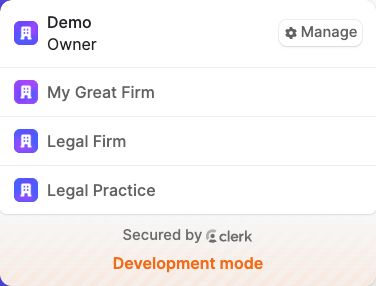
Curia switches to the selected account and takes you to the landing page for your role there.
Returning to your primary account
When you’re working in any account other than your primary one, a Return to [primary account name] shortcut sits just below the switcher. Click it to jump back without opening the dropdown.
What changes between accounts
Each account has its own reviews, team members, roles, settings, billing, library and field configuration. Your profile (name and email) is the same everywhere, but your role can differ from one account to the next. You might be an owner in one firm and a conveyancer in another.
Joining another account
To gain access to another firm’s account, someone from that organisation needs to invite you to your email address. Once you accept, you’ll find the new account in your switcher.
FAQ
Can I work in more than one account at the same time?
No. The switcher lists every account you have access to, but you work in one at a time.