Reset review data
Reset clears the in-progress review state on a contract so you can start the review again from scratch. The action is irreversible.
What reset clears
Reset wipes every field value you have manually entered or changed. Starting values that Curia extracted from the contract on upload are applied, so the fields are back to the state you first saw.
Any contacts linked to the review are unlinked. See Linking contacts to reviews.
Reset does not touch the contract PDF, the document map, or the Preflight results.
On a completed review, reset also reopens it to In review and discards the report draft, since the cleared data no longer matches the report you generated. Report versions you have already downloaded are kept. See Report versions.
How to reset
Open the review and click the menu icon in the header, then click Reset all data. The option is there once you have started the review, while it is In review or Completed.
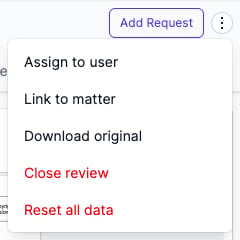
A warning dialog asks you to confirm. Click Reset to clear the review, or Cancel to keep your work.

Reset opens the review on the Client tab.
FAQ
Does reset affect the contract or the report?
The uploaded contract is untouched, as is every report version you have downloaded. On a completed review, the report draft is discarded and the review reopens so you can work on it again.
Does reset trigger a new charge?
No. Resetting a review does not incur a fee.
Can I reset a closed review?
No. Reopen it first with Reopen review. A review that was closed while In review returns to In review, where Reset all data is in the header menu. See Understanding review states.