Managing amendments and questions
Add and edit the standard amendment and question text Curia raises with the vendor's solicitor, or deactivate the entries you don't want applied.
The Library holds the standard requests Curia raises with the vendor’s solicitor, split across two tabs: Amendments and Questions. Each entry has two parts:
- An Amendment request for vendor’s solicitor - the wording sent to the other side.
- A Recommendation for client - a plain-language explanation for your client.
Amendments ask for the contract to be changed. Questions ask the vendor’s solicitor for information. The two tabs hold the same kind of entry; the type decides which list an entry feeds on a review and how it is sent. See Amendments and questions.
Active entries are applied automatically when a relevant field value is detected during processing, or when a matching Preflight warning is carried into the review. Disabled entries are skipped.
Adding an entry
Open Settings > Library and switch to the Amendments or Questions tab. The tab you add under sets the type. If your account operates in more than one state, use the Change State dropdown at the top to narrow the table.
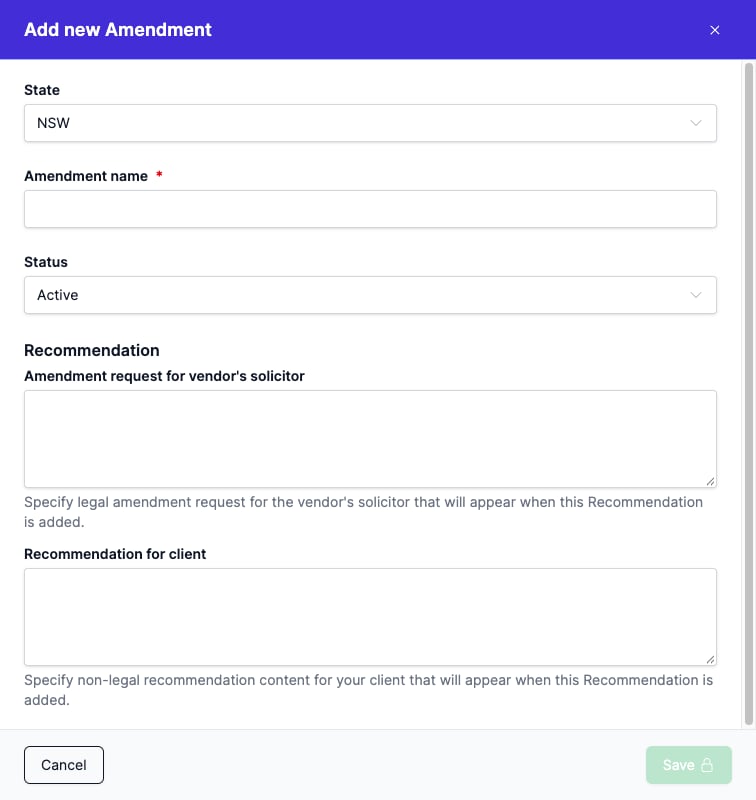
Click New amendment or New question and fill in:
- State - which state the entry applies to. Shown when your account operates in more than one state. Set this at creation; it can’t be changed afterwards.
- Amendment name or Question name - how the entry is listed.
- Status - Active or Disabled. Controls whether the entry is applied. New entries are Active.
- The Amendment request for vendor’s solicitor and Recommendation for client text.
Click Save. Changes affect future reviews only.
To reclassify an entry between Amendment and Question, disable it and create a new one of the right type. The type is fixed once the entry exists.
Editing an entry
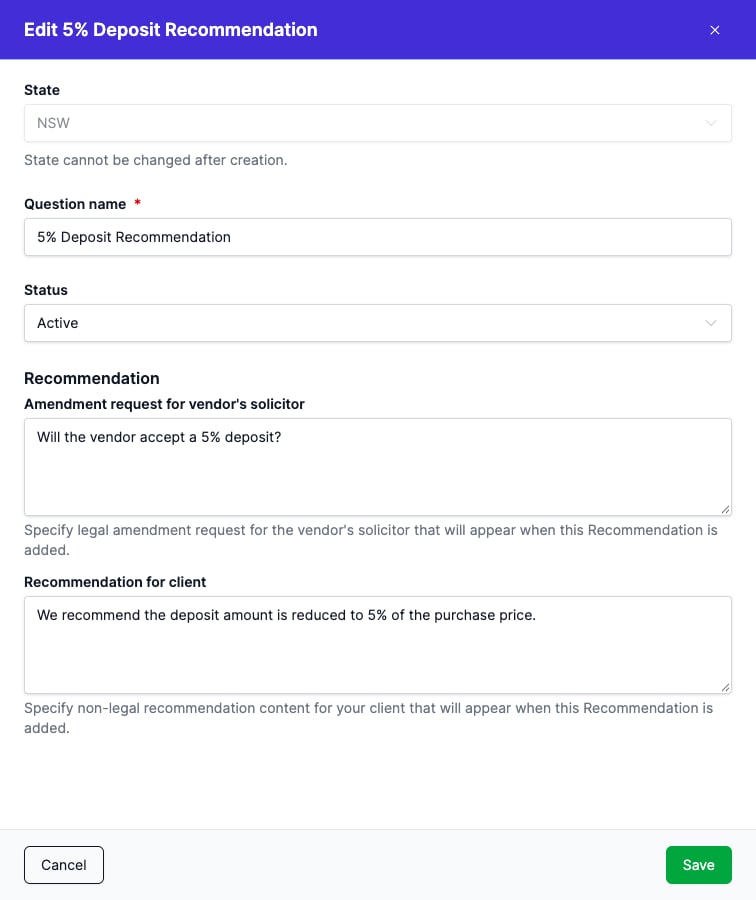
Click any row in the table to open the side panel. You can change the name, the amendment text, the client recommendation text, and the Status. The State is fixed after creation. Click Save to apply.
What a disabled entry does
A disabled entry is not applied. On a field driven by that entry, the Advice control still shows, so you can switch to Manual and write your own wording for that review. A disabled entry is also not carried into a review from a matching Preflight warning, which is how you stop that warning becoming a request on every file. See Amendments and questions.
FAQ
What’s the difference between the Amendments and Questions tabs?
Amendments ask the vendor’s solicitor to change the contract. Questions ask them for information. An entry’s type sets which list it feeds on a review and is fixed when the entry is created.
Can I delete an entry?
You can’t delete an entry, but you can disable it. Set its Status to Disabled and it is no longer applied to any review.
Does disabling an entry affect reviews already open?
No. Disabling only takes effect on new reviews. Reviews already open keep the entries they had at the time.
Can the same entry differ between NSW and VIC?
Yes. Entries are state-scoped; the NSW and VIC entries are independent.