The Parties tab
The Parties tab captures everyone involved in the transaction other than your client - the vendor and their solicitor and agent, and the purchaser's solicitor and agent.
The Parties tab captures the people and firms involved in the transaction other than your client. The client’s own details sit on the Client tab.
Vendor
The names of the people or entities selling the property. Curia pre-fills these from the contract front page.
If the names here are not written exactly as the registered owners on the title search, a Vendor name mismatch notice lists the title search owners and the vendors. A difference in letter case or spacing alone doesn’t count. A vendor listed twice against one owner is a mismatch.
The notice explains each difference. A spelling difference highlights the differing letters on both names.
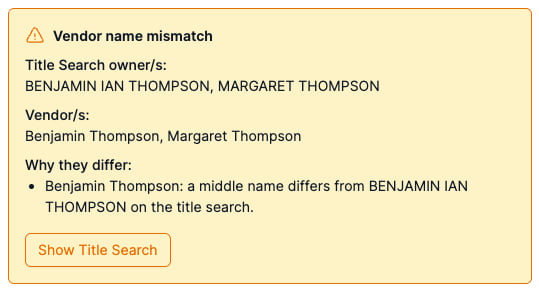
The Show Title Search button on the notice jumps the PDF to the relevant page. Preflight’s Vendor name row uses the same check - see Preflight - Match and currency checks.
VIC VIC: details specific to Victoria reviews
On an off the plan pack that includes the developer’s head agreement, the notice does not appear: the vendor being the developer rather than the registered proprietor is expected here, not a mismatch.
Vendor’s agency, agent and agent email
The real estate agency listed on the contract, the individual agent, and the agent’s email. A second co-agency field is available if the property is jointly listed.
Vendor’s solicitor firm, solicitor and solicitor email
The vendor’s legal representative - the firm, the individual handling the file, and the email address. These values feed the Counterparties reports.